TicketSync Pro
Seamlessly connect your Zendesk Support tickets with GitHub issues.
TicketSync Pro bridges the gap between your support agents and engineering team. By keeping both sides in sync, TicketSync Pro ensures that your support team always knows the status of a bug fix or feature request, and—most importantly—helps you close the loop with your customers automatically when the work is done.
Built with simplicity and security in mind, TicketSync Pro requires zero complex configuration. It uses secure OAuth authentication to keep your data safe without sharing passwords. Whether you are a small startup or a growing enterprise, TicketSync Pro helps you streamline your support-to-engineering workflow so you can focus on building great products.
Why TicketSync Pro?
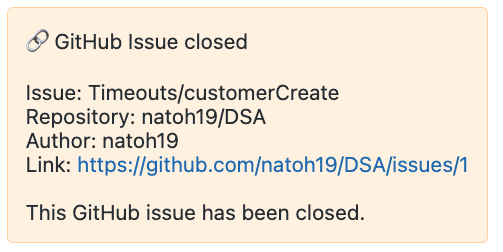
- Close the Loop Automatically: Unlike other tools, TicketSync Pro doesn’t just sync data—it helps you delight customers. When an engineering issue is resolved in GitHub, TicketSync Pro automatically notifies your customer that the fix is live.
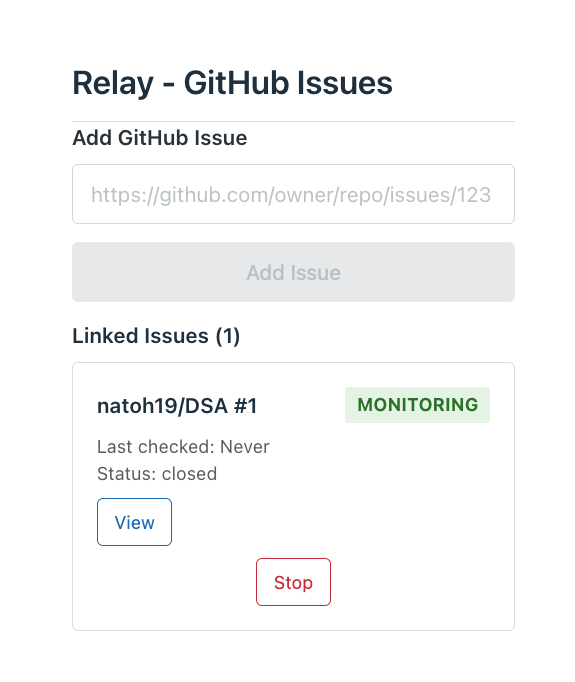
- Stay in the Know: Support agents can see the real-time status of linked GitHub issues (
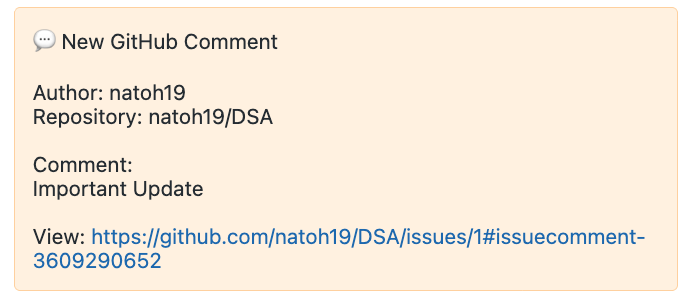
OpenorClosed) directly within the Zendesk sidebar. Comments made by engineers on GitHub are posted as internal notes on the ticket, giving agents full context without needing a GitHub account. - Secure by Design: TicketSync Pro uses industry-standard OAuth 2.0 for authentication. We never ask for or store your personal passwords or access tokens.
- Zero Friction Setup: Install the app, click "Connect," and you’re ready to go. No complex webhooks to manually configure or servers to manage.
Features
- Link Existing Issues: Easily link GitHub issues to Zendesk tickets by pasting the issue URL directly in the sidebar.
- Real-Time Status Sync: Instantly view the live status of linked GitHub issues (
OpenorClosed) from within Zendesk. - Contextual Updates: Engineering comments and Pull Request activity (opens, merges, closures) are automatically posted as internal notes on the Zendesk ticket.
- Automated Customer Notification: When a linked GitHub issue is closed while still connected to a closed ticket, TicketSync Pro automatically creates a follow-up ticket and emails the customer to let them know the fix is live. (Don't want to notify the customer the issue has been closed? Simply click "Stop Monitoring" on the issue before the ticket is marked as Solved).
- Secure & Simple: No shared passwords. Uses secure OAuth 2.0 to connect your GitHub organization in seconds.
How to Install
- Install TicketSync Pro from the Zendesk Marketplace.
- Open any ticket in Zendesk and open the TicketSync Pro app in the sidebar.
- Click Connect GitHub and authorize the GitHub App for your organization and repositories.